

VITREOUS
YOUR MUSIC DESERVES BETTER THAN A BASIC EMBED


As of v12.0.0, I restructured track handling, this process was tedious. Instead of needing to create a library to then add track and artists, the backend now prioritises Tracks and Artists as primary input and Libraries are now Playlists. This substantial decreases the time needed for data inputting and makes sharing any one track to any number of playlists sharing the total counts of all plays and likes of the track.
Want to know more about Vitreous or learn about its use, you can use these 2 below to navigate to additional areas you need:
Changelog
Find out how the development is going and see in detail how changes to all Vitreous sections from the backend, page building and frontend are impacted.
Knowledgebase
Get help in regards to the use of all functions of this plugin; its backend, its addition to pages and frontend use.
Quickly find out about each aspect of Vitreous using these anchor links:
FRONTEND - MAIN PLAYER
The Main Player is where it all started... VAMP became Vitreous.
FRONTEND - TRACK LIST ACCORDION
The Track List Accordion, maximum detail, minimal code.
FRONTEND - ARTIST CARD
Show off your artist self or those individual artist buddies.
FRONTEND - ARTIST LIST ACCORDION
The ultimate artist buddy showcase! Show off all your artist mates.
FRONTEND - Single Track Player
1 track at a time.
FRONTEND - Site Wide Statistics
The ultimate frontend statistics share.
FRONTEND - Artist Statistics
Share your personal performance.
Page Integration
Shortcodes, Elementor, Gutenberg. Oh my!
Backend - OVERVIEW
A simple way to get started.
Backend - TRACK MANAGEMENT
The new starting point as of v12.0.0. Add all of your tracks first.
Backend - ARTIST PROFILE MANAGEMENT
You're an artist, whoever you are! Manage yourself and other profiles.
Backend - PLAYLIST MANAGEMENT
Make and manage playlists with your existing tracks. Replaced Libraries in v12.0.0.
Backend - DISPLAY OPTIONS
Customisation options are plenty.
Backend - Metrics
Statistics are useful.
Backend - Settings
Set up your defaults and social sharing.
Backend - Extras
Additional things you might want to know about.
Offline HTML Track List Builder For Vitreous
A professional track list builder for Vitreous.
Find out about Vitreous below:
Vitreous is a powerful music player, set of artist and audio focused widgets with an extensive backend library management system for WordPress, designed to provide a seamless listening experience while offering comprehensive administrative control.
Frontend - Main Player Features
-
Standard Playback Controls
Play/Pause, Previous/Next, Shuffle, and Loop modes (Track or All).
-
Album Artwork Display
Includes eight random overlay effects and an optional animated pulsing effect that can be enabled or disabled.
-
Customisable Waveform Styles
Four distinct waveform display styles.
-
Media Recon (Track list)
Full access to the library track list with integrated search and sorting filters.
-
Time from or full track sharing
You can share a track based on the current playback position or the full track.
-
Download Support
Downloads can be provided either directly through your website or via external cloud, streaming or audio hosting platforms.
-
Keyboard Shortcuts
Expansive keyboard shortcuts for quick control over player controls without a mouse click.
-
Fullscreen / Immersion Mode
Dedicated viewing mode for an uninterrupted listening experience.
-
Advanced Volume Controls
A fully adjustable volume slider with Mute/Unmute functionality and a clear text indicator when muted.
-
Waveform Visualisation
9 optional real time visualisations are selectable and will be displayed within the waveform area.
-
Clickable Waveform Area
Quickly move your track progress.
-
Share Sidebar
Easily share tracks directly to platforms such as Bluesky, Mastodon, WhatsApp, or via email.
-
Like/Favouriting Support
Player users have the option to like your tracks, with backend statistics.
-
Extensive User Settings
Includes theming options with colour overrides, audio configuration including 3 bar EQ and audio normalisation and performance controls.
-
Accessibility Support
Built with ARIA support for improved accessibility (in BETA testing)
-
Responsive Design
Fully responsive and optimised for all devices, across vertical displays on mobile phones and tablets.
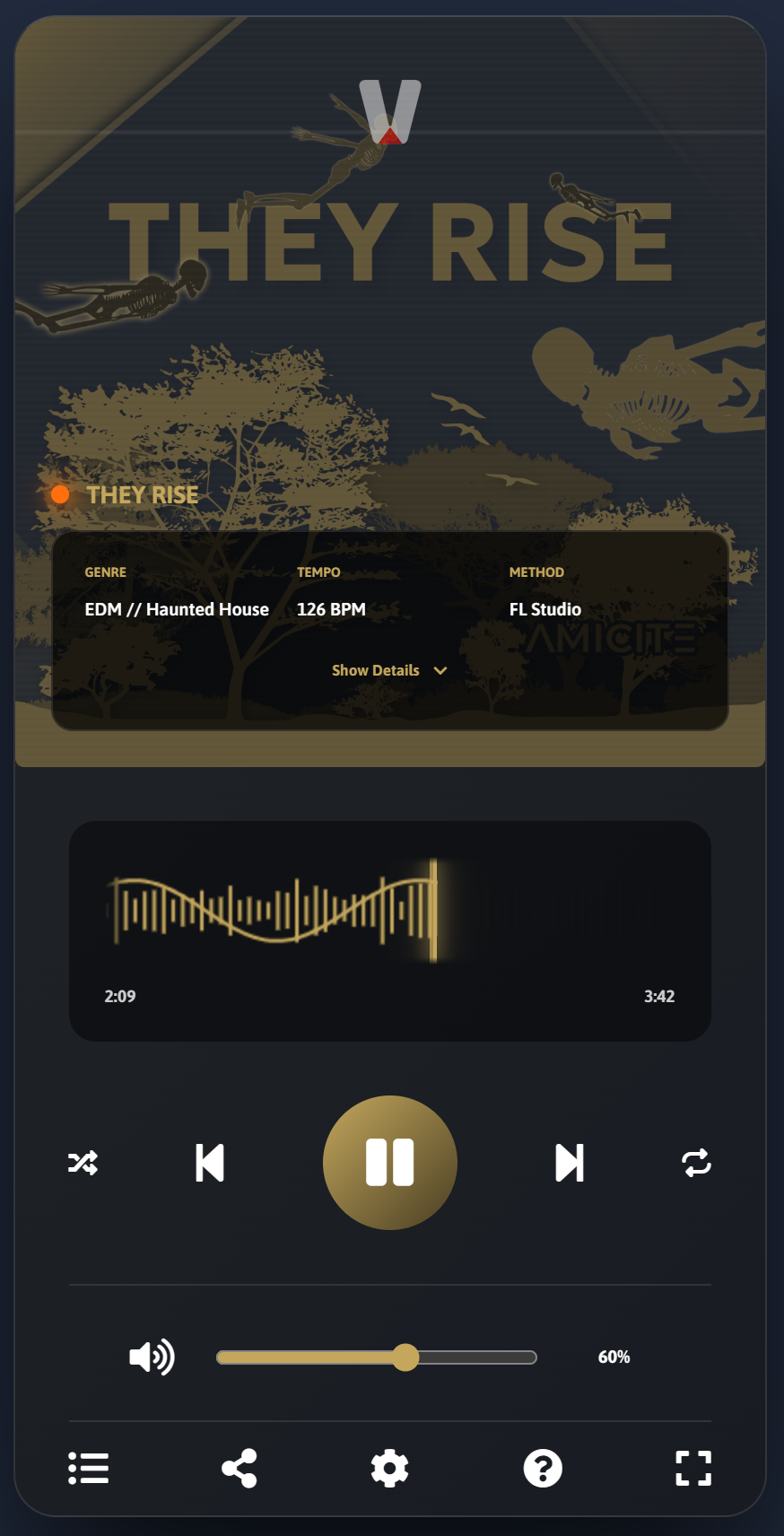
MAIN PLAYER Example
Have a play around with the main players functions. It's fun!
Frontend - Track List Accordion Features
-
Minified Per Track Player
Play/Pause and click/drag duration seeking only. Each play press will automatically stop the currently playing track.
-
Basic volume controls
Mute/Unmute, hover over speaker icon to slide out volume percentage slide bar.
-
Full track library
Shows all tracks added to a library.
-
ON PRESS TRACK DETAILS
Pressing on any track will open up the advanced details accordion. Like a track, download it (if link provided) and see how many people have played the track globally.
-
Fuzzy Search
Search the available library tracks in real time and get closely matched results instantly on each key press.
-
Pagination
Each page has 10 tracks, pagination exists at the bottom and is updated without page reloading.
-
Responsive Design
Fully responsive and optimised for all devices, across vertical and landscape displays on mobile phones and tablets.
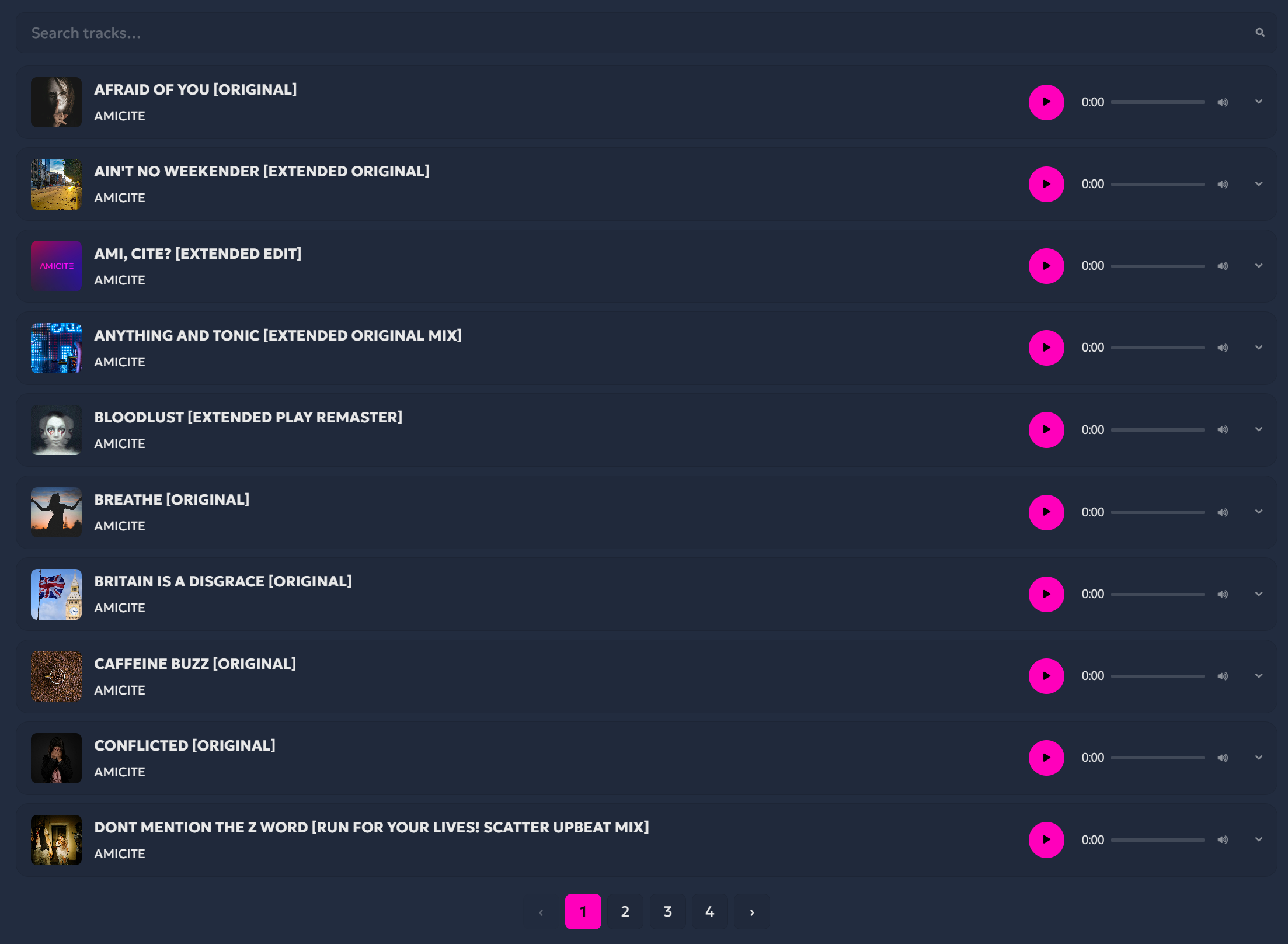
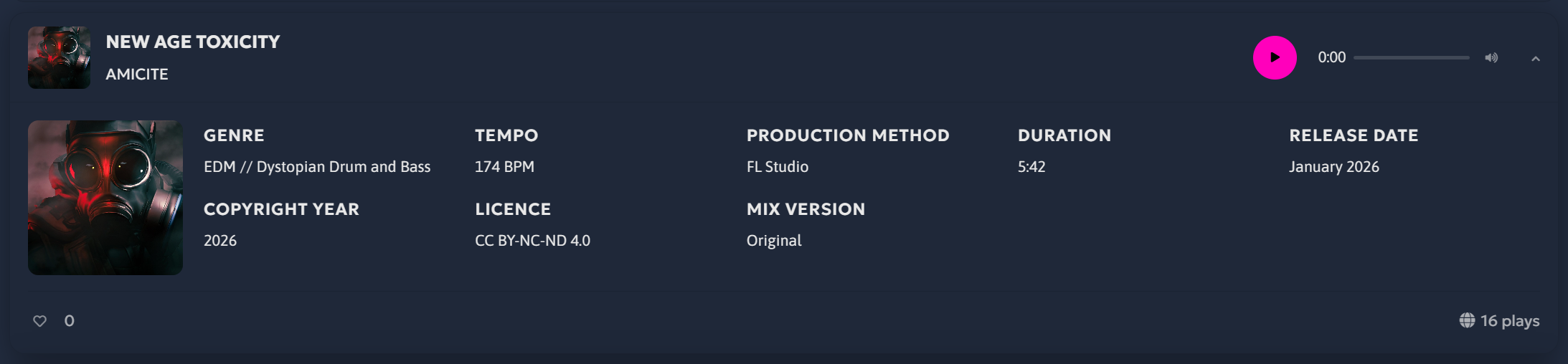
Track List Accordion Example
See how beneficial the Track List Accordion would be for your own website.
Frontend - Artist Card Features
-
5 Random Tracks in Minified Players Per Artist
The artist card will automatically show 5 random tracks by the artist. Play/Pause and click/drag duration seeking only. Each play press will automatically stop the currently playing track.
-
Artist Bio
Details about the artist such as artist name, bio and start date.
-
Artist Socials
A selection of up to 15 icons can be added and are displayed on the card when filled.
-
Responsive Design
Fully responsive and optimised for all devices, across vertical and landscape displays on mobile phones and tablets.
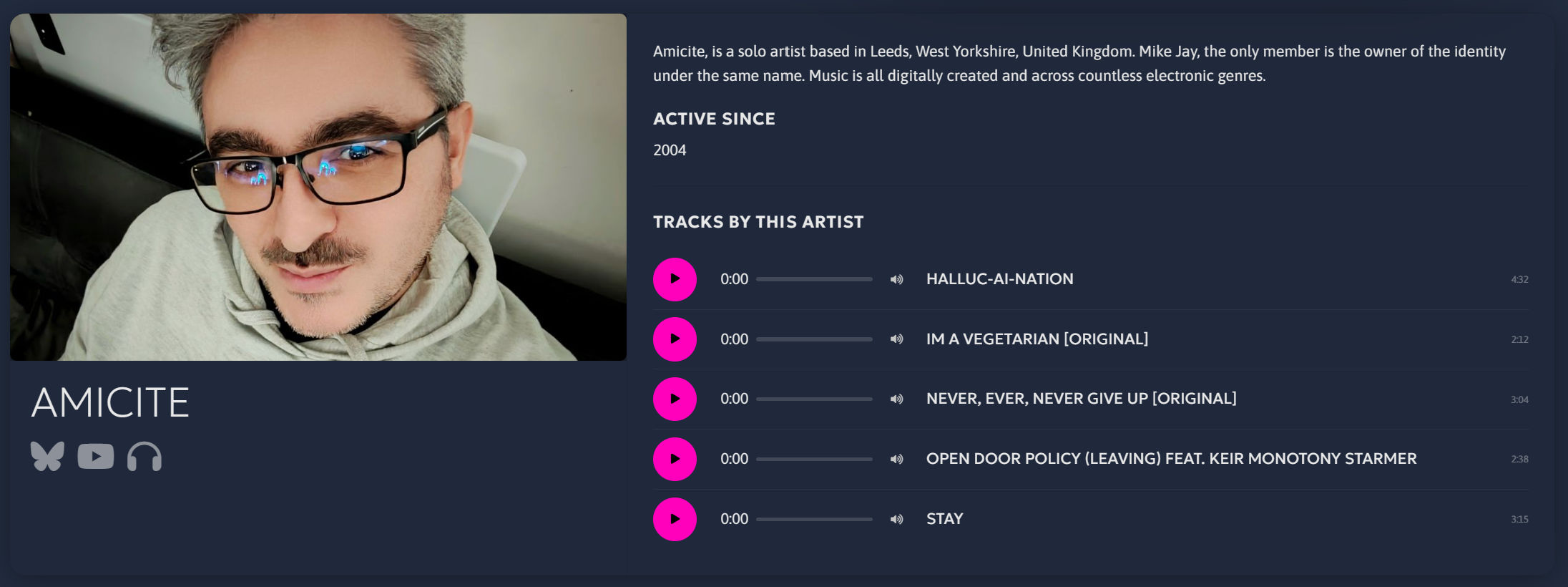
Artist Card Example
Have a look at my artist card.
Frontend - Artist List Accordion Features
-
5 Random Tracks in Minified Players
The artist card will automatically show 5 random tracks by the artist. Play/Pause and click/drag duration seeking only. Each play press will automatically stop the currently playing track.
-
Full or Specific Artists
Show all the artists you host or just a specific number of artists.
-
Artist Bio
Details about the artist such as artist name, bio and start date.
-
Artist Socials
A selection of up to 15 icons can be added and are displayed on the card when filled.
-
Fuzzy Search
Search the available artists in real time and get closely matched results instantly on each key press.
-
Pagination
Each page has 10 artists, pagination exists at the bottom and is updated without page reloading.
-
Responsive Design
Fully responsive and optimised for all devices, across vertical and landscape displays on mobile phones and tablets.
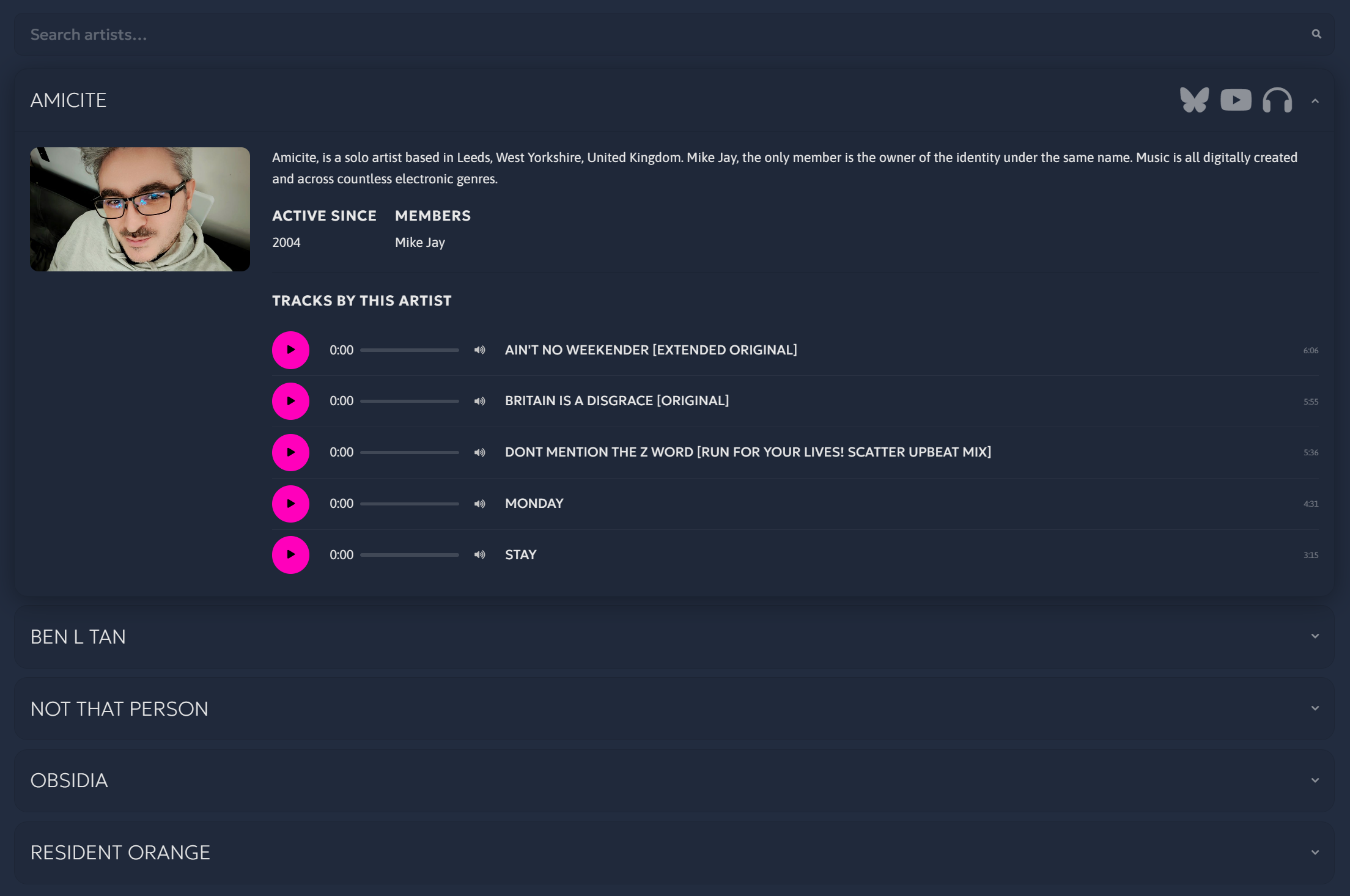
Artist List Accordion Example
Have a look at my artist card.
Frontend - Single track player Features

-
Simple Minified Player
Play/Pause and click/drag duration seeking only. Each play press will automatically stop the currently playing track.
-
Basic Track Details
Album art, track title and artist name are the only focus.
-
Basic Volume Controls
Mute/Unmute, hover over speaker icon to slide out volume percentage slide bar.
-
Responsive Design
Fully responsive and optimised for all devices, across vertical and landscape displays on mobile phones and tablets. This widget will easily conform to any container size in Elementor.
Single Track Player Examples
3 side by side single track players in this example.
Frontend - Site Wide Statistics Card
-
Show off all your music stats on the frontend
Let everyone know how many people have played and liked tracks in your libraries. Show off your growing tracks, artists and library counts. Even show your most played and most liked track.
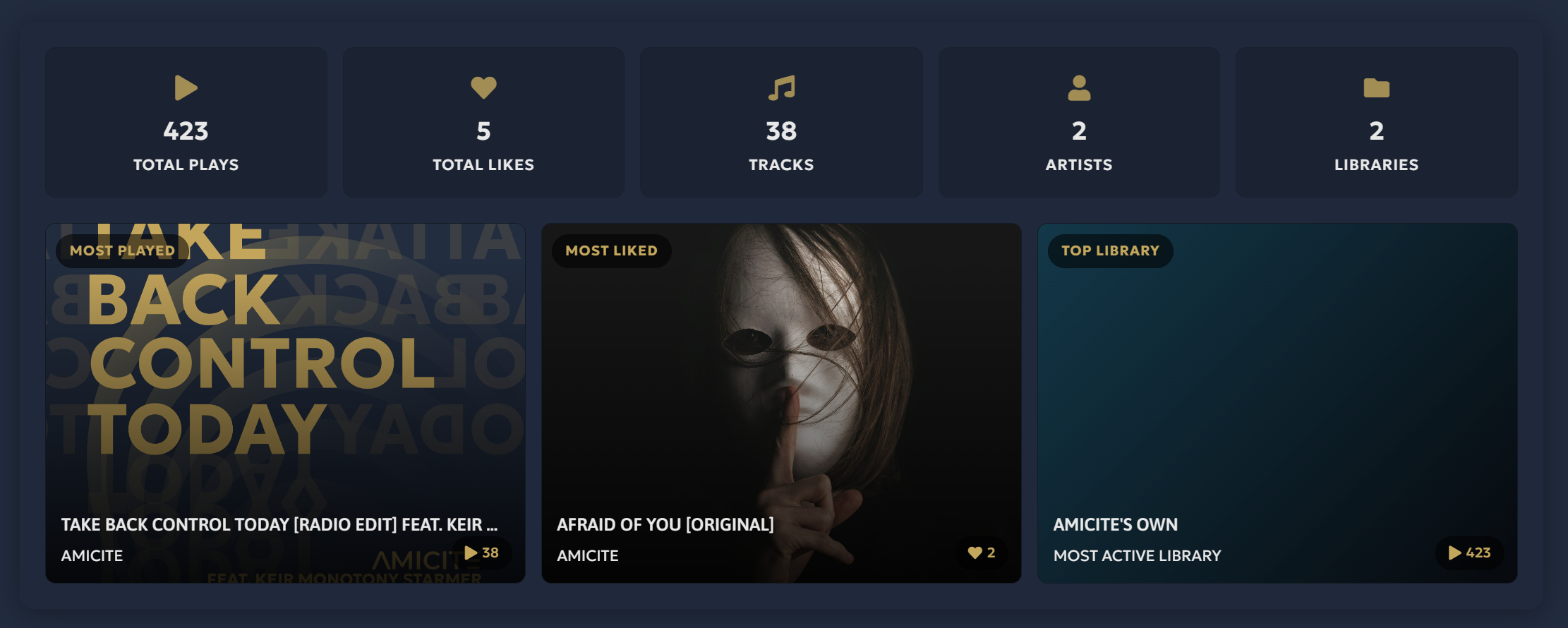
Site Wide Statistics card Example
I have added this to the Amicite home page. Go have a look.
Frontend - Artist Statistics Card
-
Show off your own music stats on the frontend
A showcase of your total track plays and likes, your most liked track and the absolute basic artist bio with your social media and audio streaming accounts.
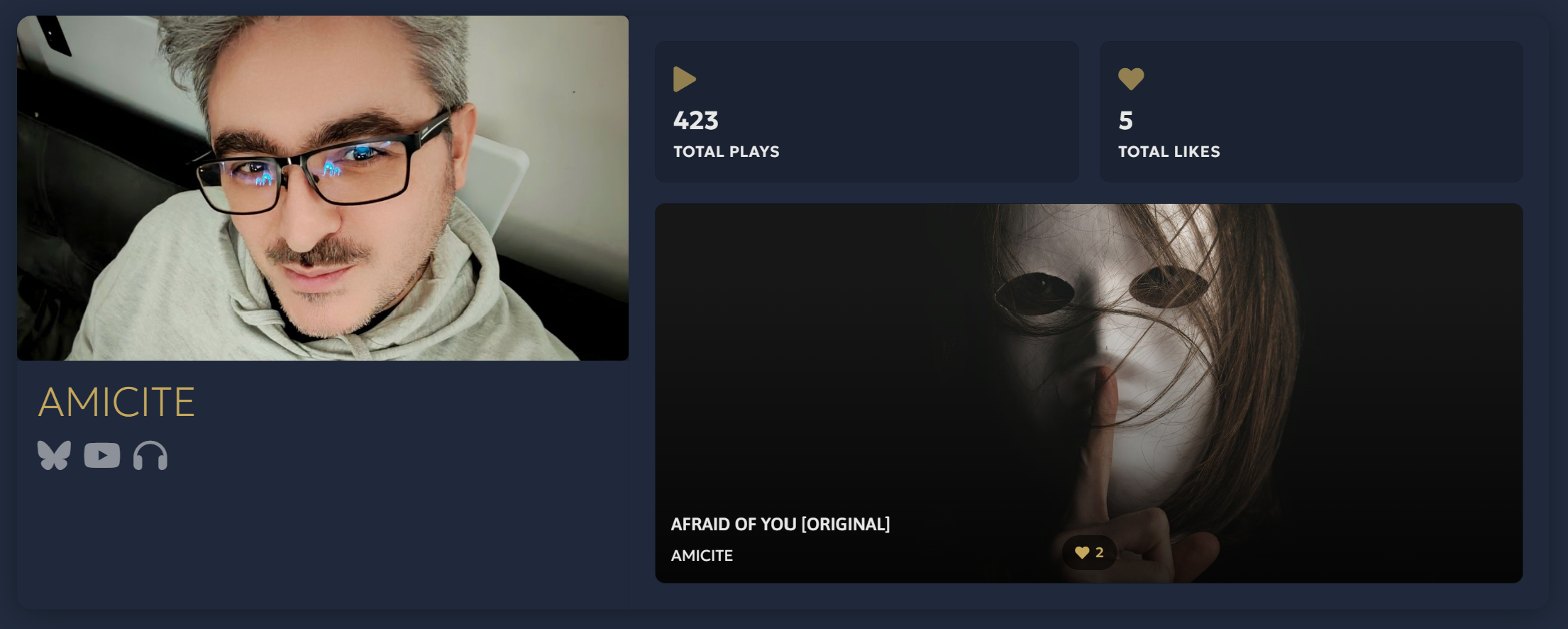
Artist Statistics card Example
See a live example for my artist profile.
PAGE INTEGRATION
-
Use the shortcodes
Not using Elementor or Gutenberg to build your pages? Worry ye not, there are 8 shortcodes to apply the main player and the 6 widgets.

-
Got Elementor Installed?
When you add a new section, press the + then type "Vitreous" in the search bar in the sidebar. All available widgets will appear.
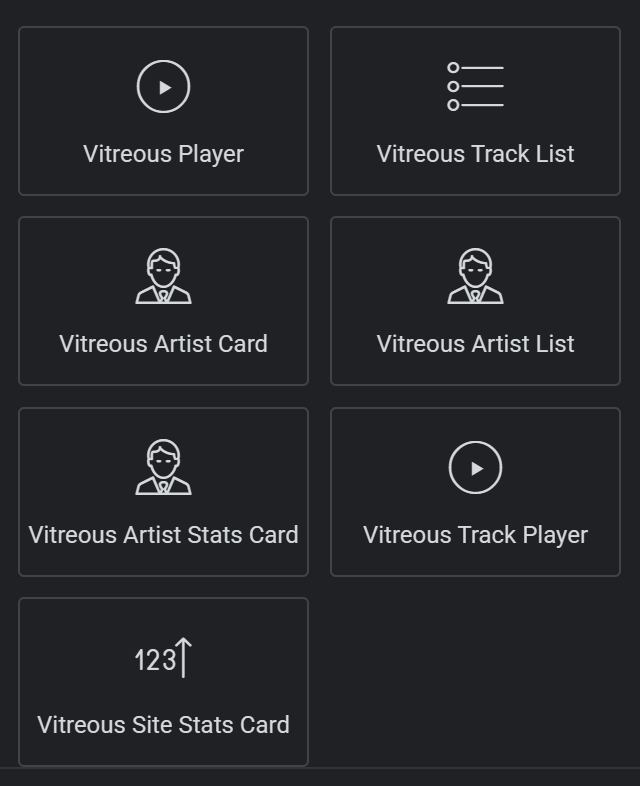
-
Using Gutenberg?
We've got you covered. Press the + then type "Vitreous" in the search bar that appears in the popup. All available widgets will appear.
Backend - Overview
-
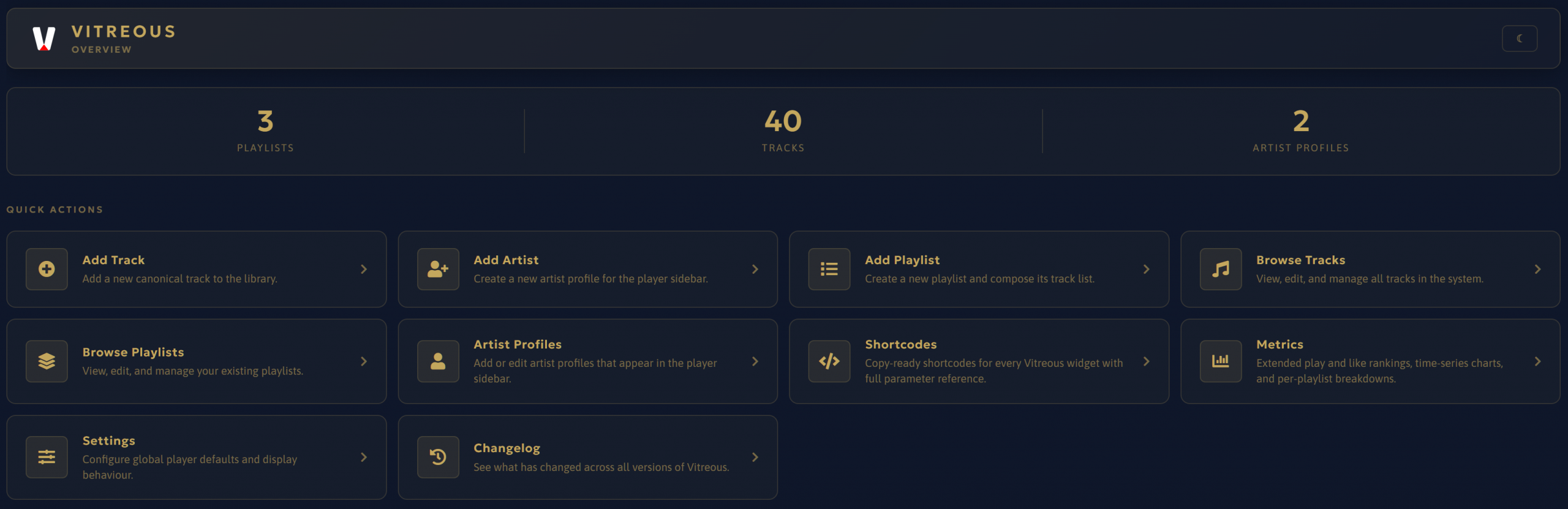
You're new here or need a refresh
The place to get where you need.
-
Basic Counts
A quick preview of the totals for Libraries, Tracks and Artists.
-
10 Most Played and Most Liked Tracks
A quick overview of the 10 most played and liked tracks as of the page load.
-
Quick Actions Area
Always beneficial to know what you're looking at and for.
-
Support Development
It's always appreciated if you choose to buy me a coffee or something more. No obligation but it helps with future development.
Backend - Track management
-
YOUR TRACKS (OR THEIRS)
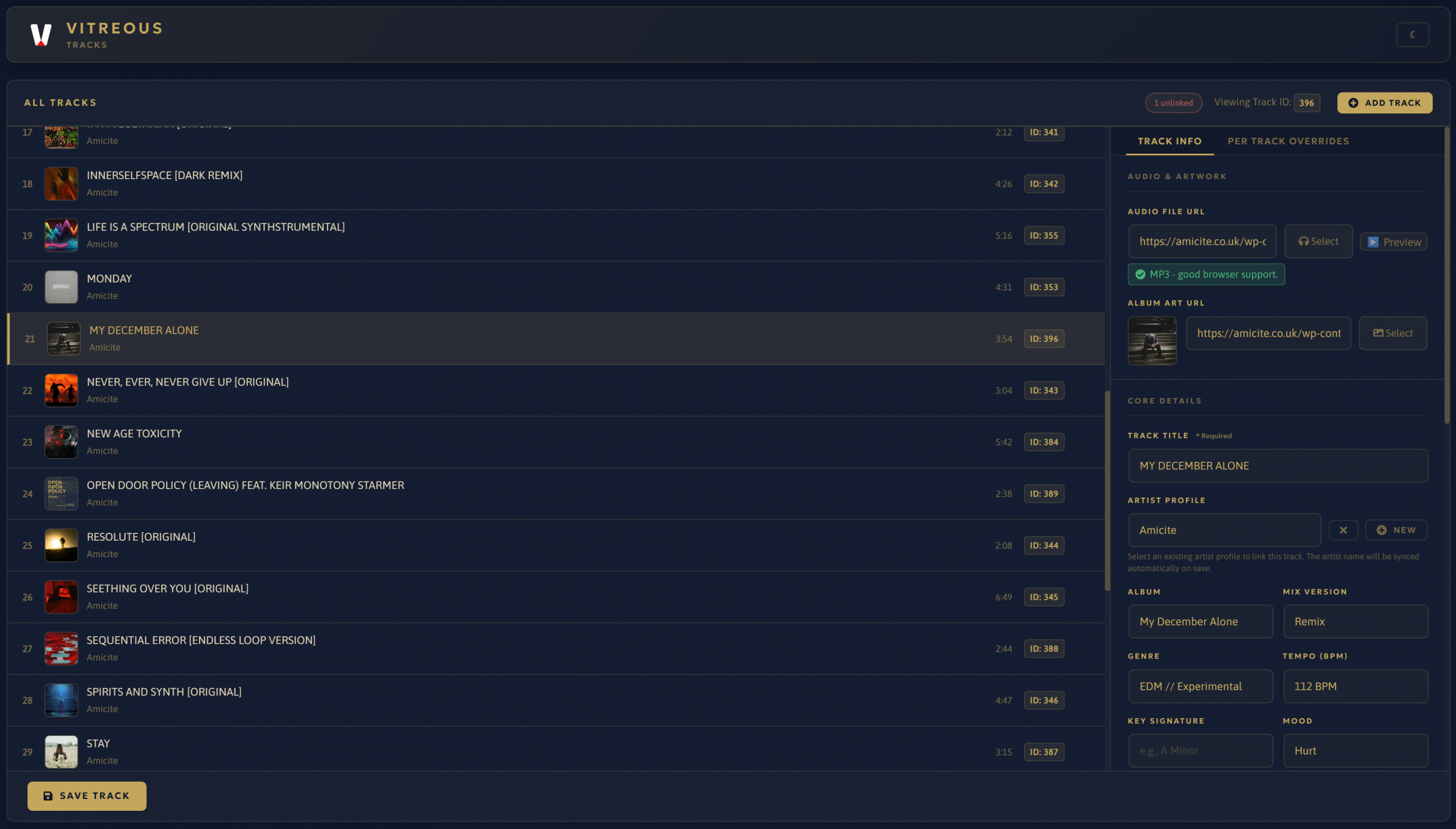
The track list manager is feature packed and robust in as small a space possible for comfortable editing.
-
Full Track Viewer
A visible list of tracks you've added. Which shows the album art, track name, artist and track duration.
-
Audio File Compatibility Indication
Not all audio files are equal across WordPress, web browsers and operating systems, which is a shame. We'll let you know if the audio file type has decent support.
-
Per Track Overrides
Want your track to control how the main player behaves? You have 6 options to tweak here should you want to.
-
Unlinked Indicator
Looking to make sure that your tracks are all linked to their correct artists. You will now see an indicator showing this next to the Add Track button.
-
Extensive Track Data Input
Are you obsessed with being accurate? Or only want to share your Artist name and track title? Worry not, the option to add to the 20 fields here, is up to you.
-
ADD AN ARTIST FROM TRACK MANAGER
Did you forget to add an artist/group/band? I've got you covered, you can now add an artist in the track manager and it will automatically assign it to the track.
-
Field Autofill
When adding an Audio File from the WordPress Media Library, it will automatically add the Track Title and track duration.
-
Track ID Indicators
New track ID indicators are shown for each track just in case you need this information when adding to the Single Track Player widget via shortcode, Elementor widget or Gutenberg block.
-
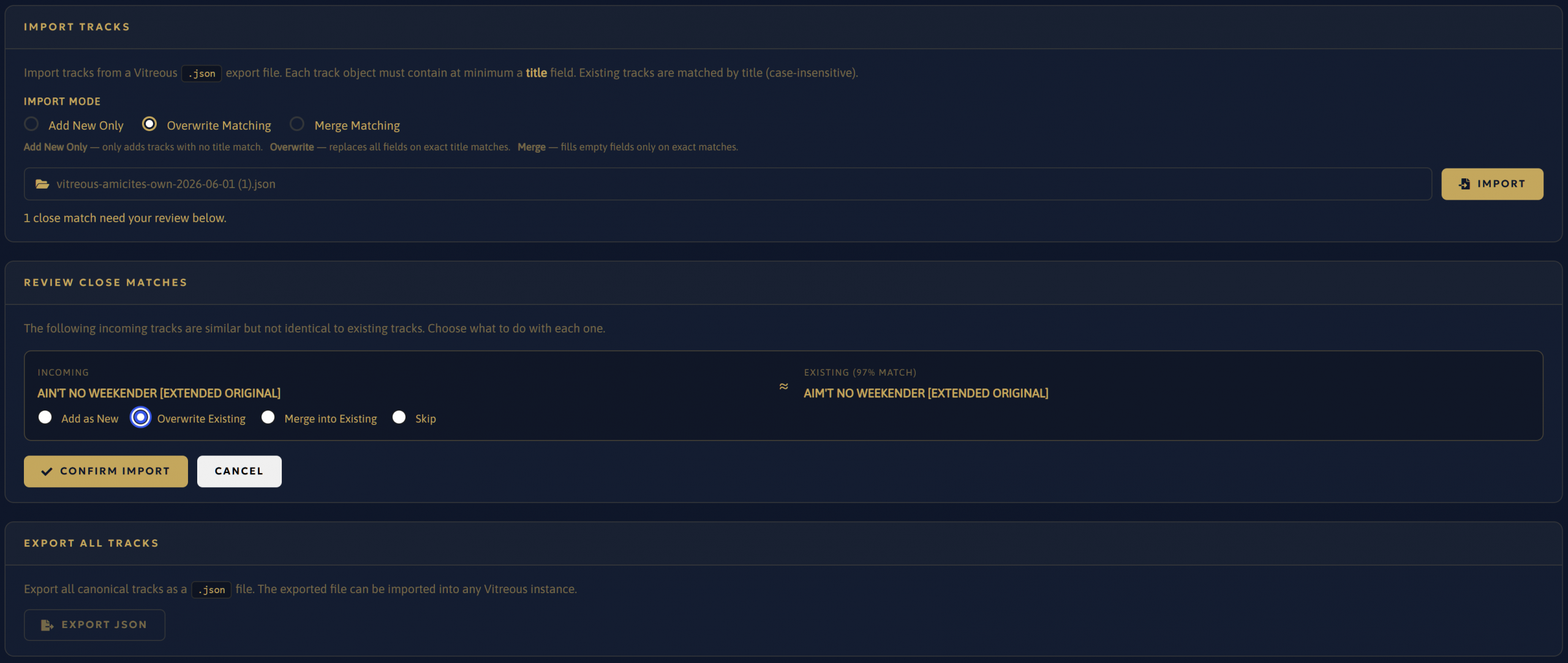
New in v11.1.5 - CLEVER IMPORT, SIMPLE EXPORT
A robust JSON import system and a simple JSON export system built to work in continuity with the Vitreous Offline Track List Builder.
Backend - Artist Profile management
-
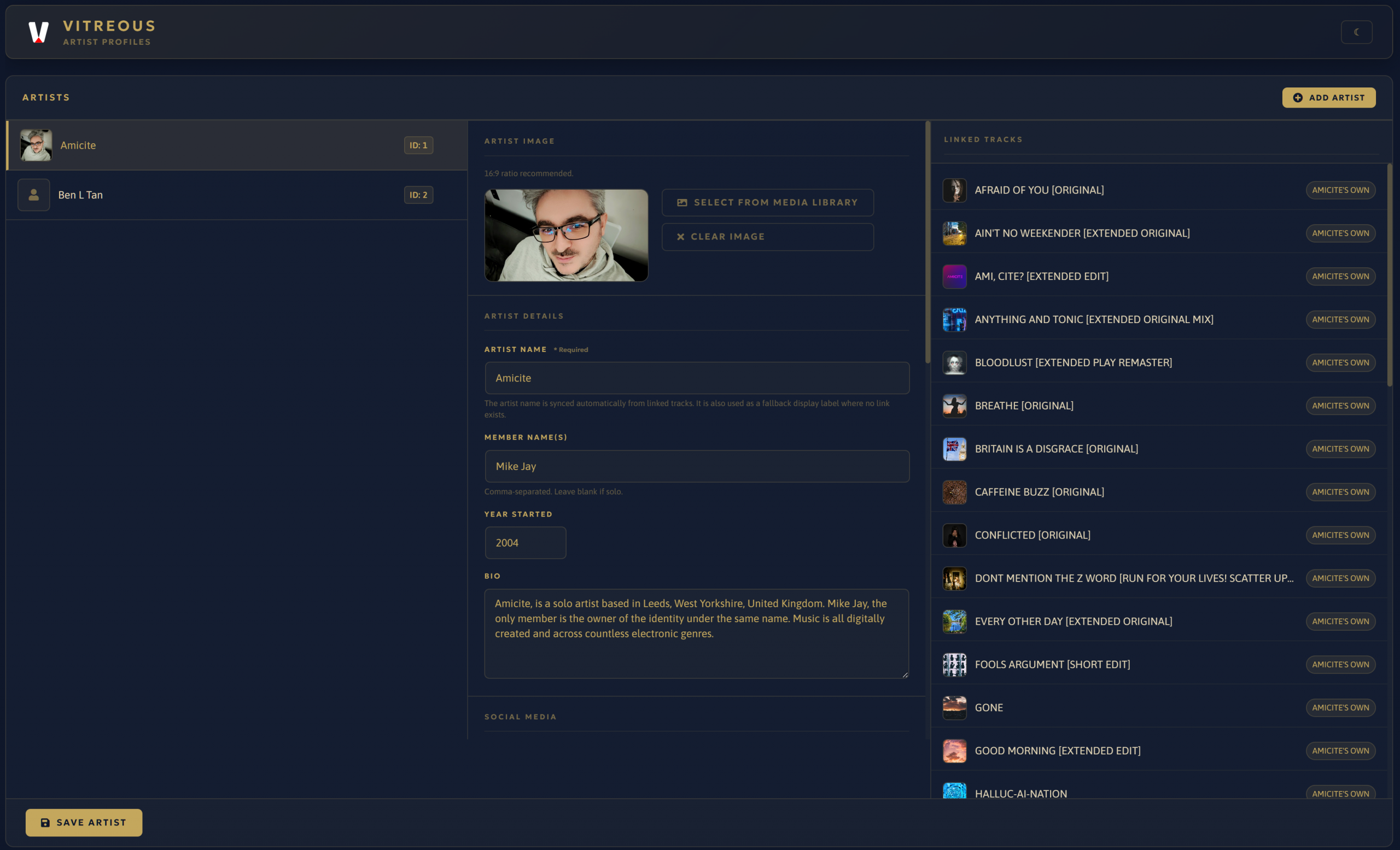
You are you, right?
Add yourself and other artists to the Artist Profiles for quicker track input.
-
Artist Profiles List Viewer
A visible list of Artist is displayed with their artist image/photo.
-
Artist Image
Add a really photogenic image of yourself or your group/band.
-
Linked Tracks
When you add an artist to a track, you will find that the Linked Tracks area will list all that artists tracks and which library they are in. Convenient.
-
Artist ID Indicators
New artist ID indicators are shown for each track just in case you need this information when adding to the Artist Stats widget via shortcode, Elementor widget or Gutenberg block.
-
Artist Detail Input
You know who you are. This lets you add your Artist/group/band name, the names of the Members in your group/band, the year you started and your bio.
-
Social Media Input
Everyone has socials. So, I've added 15 different social media/audio streaming services for you to input should you wish to share them.
-
Artist to Track Linker
Any unlinked tracks will now display under the Linked Tracks. With a quick Link to this Artist button. Simples.
Backend - Playlist management
-
YOUR PLAYLISTS
A place to start building your playlists. Comes with useful information and actions to make edits quickly.

-
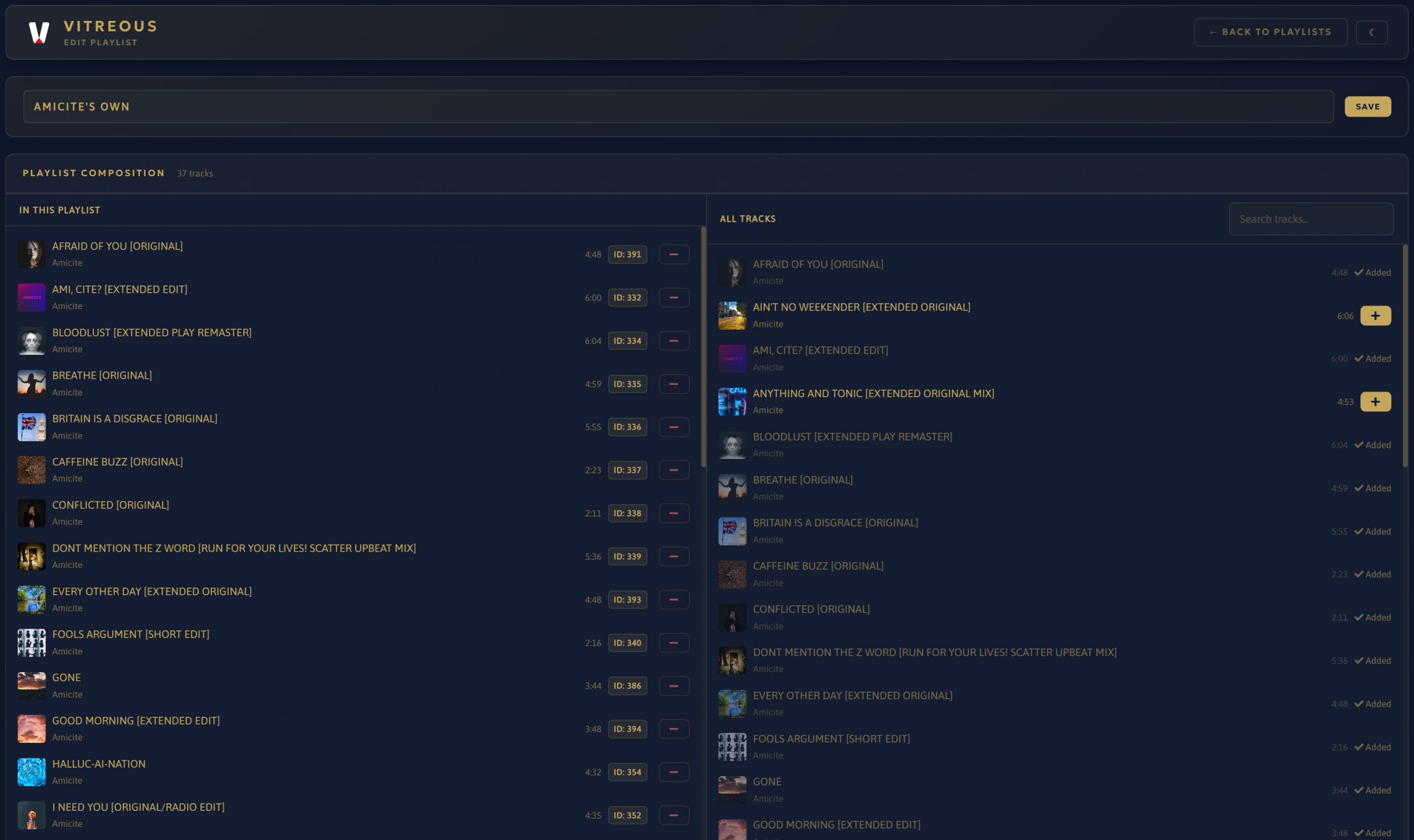
New in v12.0.0 - Managing Your Playlist
A place to start building your playlists. Comes with useful information and actions to make edits quickly.
-
Basic Playlist Title Edit
Simple way to change your playlist name.
-
Playlist Composition with quick remove (Left Side)
See the tracks you've added to the Playlist here along with the Track Art, Title, Artist and Track Duration. Remove tracks instantly using the red minus button. Simples.
-
Track ID Indicators
New track ID indicators are shown for each track just in case you need this information when adding to the Single Track Player widget via shortcode, Elementor widget or Gutenberg block.
-
Forced Alphabetical (A-Z) Sorting
In testing, it was easier to have all tracks show in both columns sorted Alphabetically.
-
All Tracks with Quick Add (Right Side)
See ALL the tracks you've added to Tracks along with the Track Art, Title, Artist and Track Duration. Add tracks to the playlist instantly using the golden plus button.. Simples.
Backend - Display Options
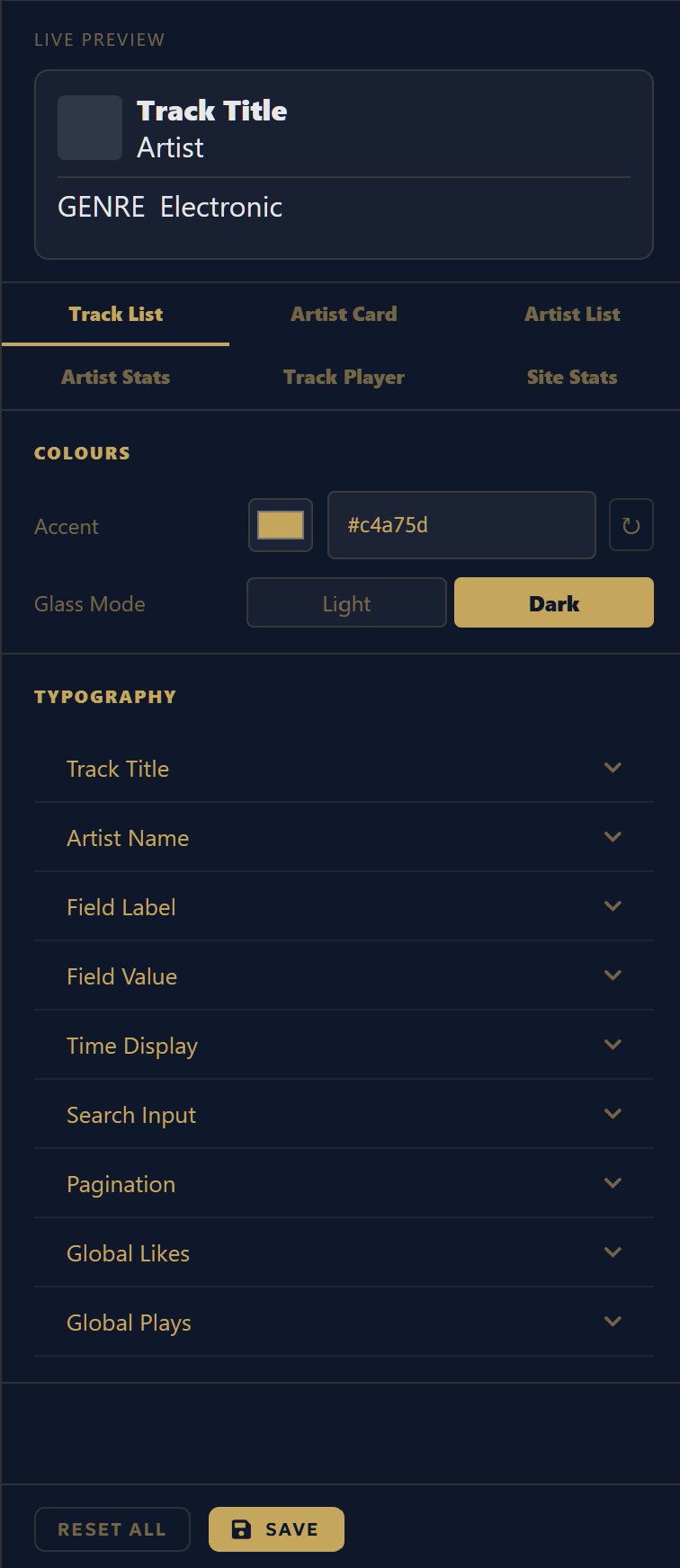
Total customisable control over the Track List Accordion, Artist Card, Artist List Accordion, Track Player, Artist Stats Card and Site Wide Stats Card widgets.
-
100's of Typography Options
Full control over your font's for all text elements in the Track List Accordion, Artist Card, Artist List Accordion, Artist Stats Card, Track Player and Site Stats Card.
-
Give it a different colour
Full control of the accent colour of the Track List Accordion, Artist Card, Artist List Accordion, Artist Stats Card, Track Player and Site Stats Card.
-
Light or dark?
No glass is perfect. You can set a Light glass or a Dark glass for the Track List Accordion, Artist Card, Artist List Accordion, Artist Stats Card, Track Player and Site Stats Card.
-
Live Preview
See what your edits will do in live preview, a simple template example of your edits that will append to the widgets.
Backend - Metrics
-
Over perform, under perform, find out how you're performing
Stats are interesting and they can be useful for finding out what your audience likes.

-
Activity Over Time Line Graph
View the Global Plays, Global Likes and plays per artist over the last 24 hours, 30 days and a year. Go custom for your own custom period (max date length is 1 year).
-
Most Played and Liked with no limits
See which tracks are most played and most liked so you can make changes to see improvements.
-
Most Played Genres, Moods and Tempos
Now even more details to look through.
-
Per-Library Totals
Find out which libraries are performing the best.
-
Most played and Liked Artists
See which artists are most played and most liked so you can make changes to see improvements.
Backend - Settings
-
Player Appearance
Configure the Main Player’s max width, default volume, theme, accent colour mode and waveform style. These settings apply only on the initial load for new users and are overridden by any user-defined preferences.
-
Share Platforms
Select up to 10 Social Media platform (out of 18) to display in the Main Player sidebar.
-
Visual Effects
Configure the Main Player’s audio visualiser, animated album art, glow effects, blur effects and album art effects. These settings apply only to the initial player experience for new users and are overridden by any user-defined preferences.
Backend - Extras
-
Backend - Light/Dark Mode
Some like it light, some like it dark. It's just a button toggle tap. Simple.
-
Backend - Database Debug
A tool used to find and address Vitreous database table issues.
-
Backend - Changelog
A comprehensive changelog is included to see how development is going.
Offline Track List Builder for Vitreous
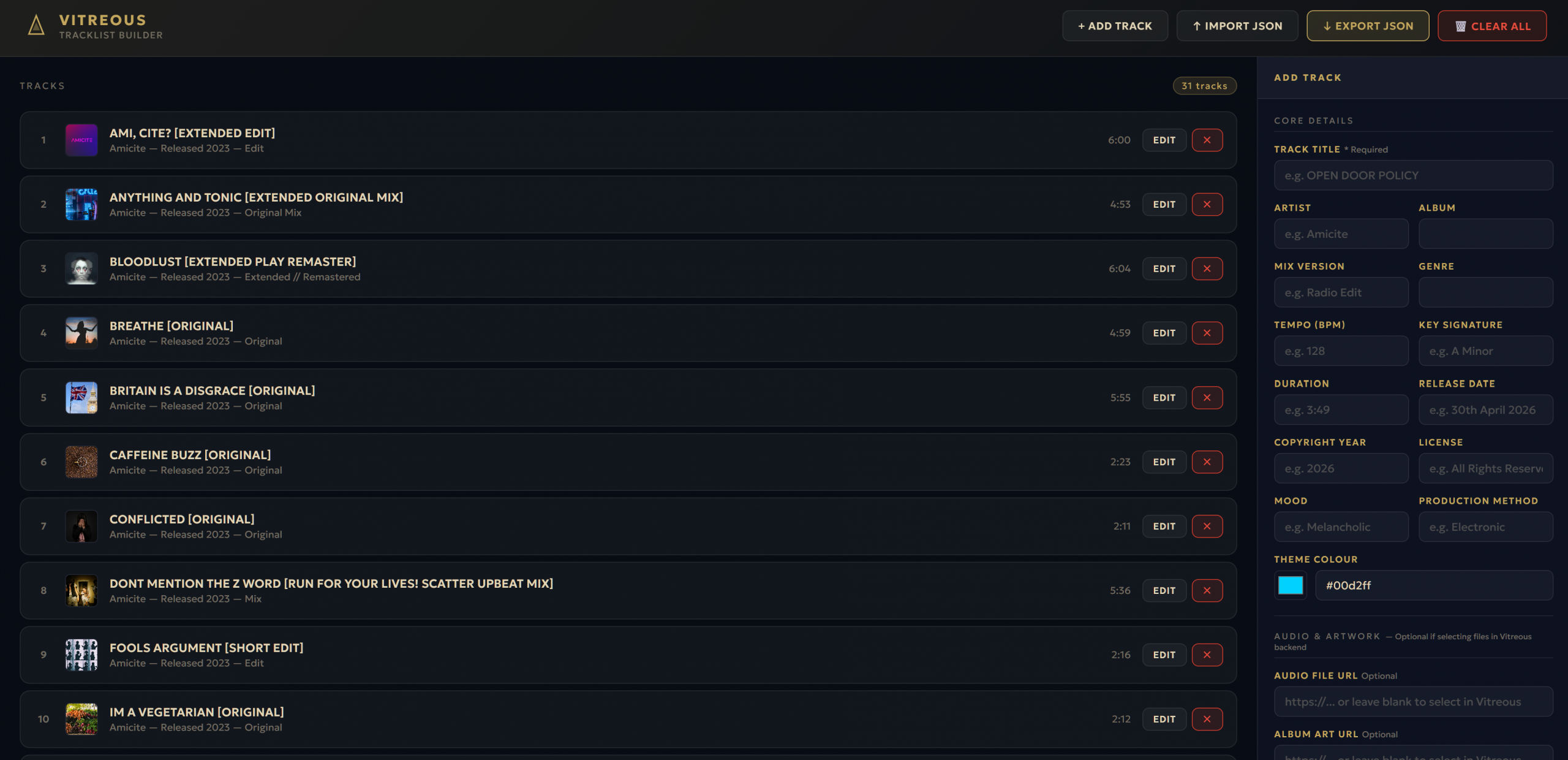
Prebuild your track list to instantly add it to a library once created with an identical layout match offline HTML which is an almost identical match to Vitreous plugin Track edit backend.
-
JSON Import/Export
Import your track list and export your track list from the Vitreous track edit backend in the plugin.
-
Expand and reduce your track list
Add and remove tracks when and if you need to.
-
Feature identical track editing
All fields on the Vitreous backend are available here, so editing is an identical match.

A fully featured music player and catalogue management plugin built for individuals, artists, groups, bands, and labels. Tracks are managed as canonical entries, each existing once in the catalogue, linked to artists, and organised into playlists. Supports multiple artists and an unlimited number of tracks and playlists. Playback, artist profiles, and track lists can be deployed to any page or post via Shortcode, Gutenberg block, or Elementor widget. Built entirely from scratch with no external script frameworks.
30th of June 2026
13.0.14 to 13.0.18 - Patch
- Fixed: Iconify icons not displaying - CDN dependency removed: Both the Iconify web component (
iconify-icon.min.js) and the icon data (vitreous-icons.js) are now served entirely fromassets/. No external CDN calls are made at any point.iconify-icon.min.js(v2.3.0) added toassets/.vitreous-icons.jsadded toassets/- callsIconify.addCollection()with SVG body data for all eightline-mdicons used across the Track List, Artist Card, Artist List, and Single Track Player widgets, pre-loading them so the web component never needs to fetch fromapi.iconify.design. Both scripts registered viawp_register_scriptoninitin a newregister_scripts()method, enqueued viawp_enqueue_scriptinenqueue_fontawesome().vitreous-iconsdeclaresiconify-iconas a dependency so load order is guaranteed. All elements and JS icon state handling remain exactly as v13.0.13. - Added:
assets/iconify-icon.min.js- Iconify web component v2.3.0, served locally. - Added:
assets/vitreous-icons.js- local icon data bundle for all eight line-md icons. - Added:
assets/line-md--*.svg- source SVG files for all eight icons.
10th of June 2026
13.0.12 to 13.0.13 - Patch
- Changelog: per-major version files:
CHANGELOG.mdsplit into individual files per major version in achangelog/directory (CHANGELOG-13.md,CHANGELOG-12.md, etc). The admin page now reads only the selected major version file: dramatically faster load on shared hosting. Major version tabs added to the top of the changelog page for navigation. Search and pagination work within the selected major version. Active tab highlighted in gold. Future builds prepend new entries tochangelog/CHANGELOG-{major}.md.
- Database Debug | Full v12 rewrite: Page rebuilt to reflect the canonical track architecture throughout. Removed the legacy "All Tracks" panel that read
library_idandtrack_orderfromvitreous_tracksdirectly. Removed legacy library-scoped duplicate detection and orphan query. - Playlists Table: Track counts now sourced from
vitreous_library_tracksjunction table. - All Tracks: Lists all canonical tracks with playlist membership shown via junction join. Duplicate detection is now title-only across the global track table.
- Orphaned Track Maintenance: Orphan definition updated. A track is orphaned if it has no row in
vitreous_library_tracks(not if itslibrary_idcolumn references a missing library). Purge query updated to match. - Featured Artists Integrity: New panel checks
vitreous_featured_artistsfor stale rows where the referenced track or artist no longer exists. - Terminology: "Back to Libraries" updated to "Back to Playlists". "Libraries Table" renamed to "Playlists Table". Junction table panel renamed to "Playlist-Track Junction Table".
- Removed: Drag-to-reorder from the Playlist composer. Both panels now sort A-Z by title consistently. Frontend players use their own sort methods; manual sort order in the admin was unnecessary.
- Changed: Playlist left panel and right panel picker both order by
t.title ASC.ajax_get_playlist_tracks()updated to match.ajax_reorder_playlist()handler and AJAX registration removed. Drag handles, save order button, reorder notice, andenableDrag()all removed fromadmin.jsandlibrary-edit.php.vt-playlist-drag-handleCSS rule removed.


![Magpies [Fractured Earth Remix]](https://amicite.co.uk/wp-content/uploads/2026/06/Magpies-Fractured-Earth-Remix-mp3-image-scaled.jpg)
A fully featured music player and catalogue management plugin built for individuals, artists, groups, bands, and labels. Tracks are managed as canonical entries, each existing once in the catalogue, linked to artists, and organised into playlists. Supports multiple artists and an unlimited number of tracks and playlists. Playback, artist profiles, and track lists can be deployed to any page or post via Shortcode, Gutenberg block, or Elementor widget. Built entirely from scratch with no external script frameworks.
Share it, so others know...
- Share on Bluesky (Opens in new window) Bluesky
- Share on Mastodon (Opens in new window) Mastodon
- Email a link to a friend (Opens in new window) Email
- Print (Opens in new window) Print
- More
- Share on X (Opens in new window) X
- Share on WhatsApp (Opens in new window) WhatsApp
- Share on Reddit (Opens in new window) Reddit
- Share on Pinterest (Opens in new window) Pinterest
- Share on Threads (Opens in new window) Threads
- Share on Tumblr (Opens in new window) Tumblr
- Share on Facebook (Opens in new window) Facebook
- Share on Telegram (Opens in new window) Telegram
- Share on Nextdoor (Opens in new window) Nextdoor
- Share on LinkedIn (Opens in new window) LinkedIn
- Share on X (Opens in new window) X